

Payroll & HRMS
Biometric attendance software that feeds payroll directly
Most attendance machines end in an export, and most payroll starts with someone retyping it. In AurumOne the biometric devices push punches straight into the system, and the monthly muster builds itself.
From the device to the muster
Each attendance device is registered by its serial number and pushes punches in as they happen. Every employee is mapped to their record on the device, so a punch always belongs to a person.
The monthly muster shows, for each employee, days present, weekly offs, holidays, leave and absences, with total work and overtime hours. Open a row and you see every day of the month: in, out, work, overtime, break and status.
- Daily sheet and monthly views
- Export to PDF or Excel, for everyone or a selection
- Manual adjustments when a punch was genuinely missed
The problems it catches for you
Bad attendance data is quiet. It shows up weeks later as a salary dispute. AurumOne counts the problems and queues them for review instead: punches that match no employee, days with an in but no out, punches held for checking, a device whose clock has drifted, and commands a device never acknowledged.
- Orphan punches, unmatched to an employee
- Incomplete days, missing an in or an out
- Clock drift shown per device
- A live feed of punches as they arrive
Late arrivals, breaks and excused absence
Late is measured against the shift start plus a grace period you set. Break violations are tracked on their own. A late arrival or an absence can be excused, and days that need a decision are collected under "needs review" so nothing is settled by accident.
In practice
AurumOne, our payroll and HRMS product
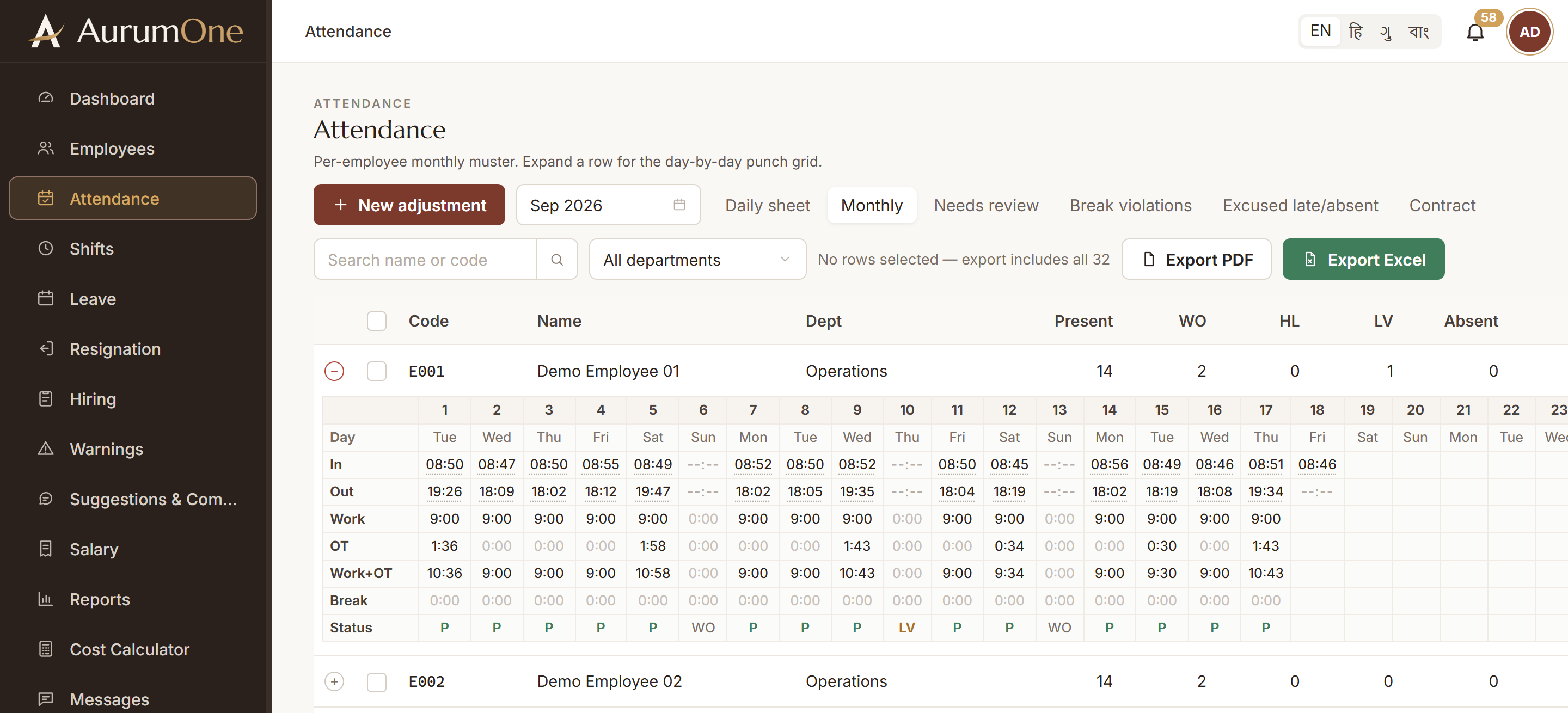
Screens recreated with sample data for a demo company. See every screen
Questions
Common questions
Do we need to buy new attendance machines?
Not necessarily. Tell us the make and model you have. If a device can push or share its punch data, it can usually be connected.
What happens when someone forgets to punch out?
The day is flagged as incomplete and appears for review. A supervisor corrects it with an adjustment, and the salary follows the corrected hours.
Can we see who is in right now?
Yes. The dashboard shows who is clocked in, clocked out, present, absent, late and on leave today, and refreshes every 30 seconds.
Related